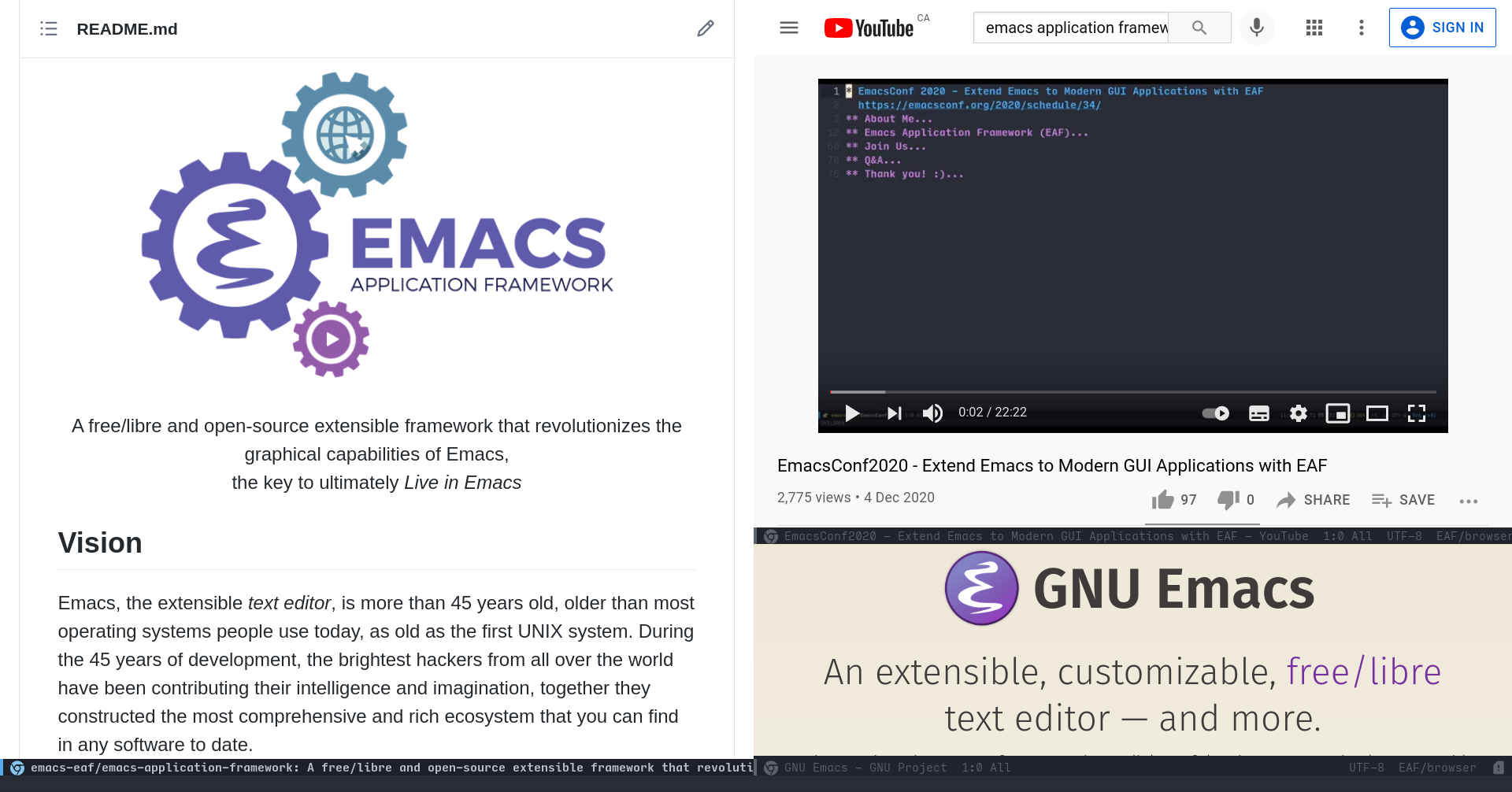
A free/libre and open-source extensible framework that revolutionizes the graphical capabilities of Emacs,
the key to ultimately Live in Emacs
A free/libre and open-source extensible framework that revolutionizes the graphical capabilities of Emacs,
the key to ultimately Live in Emacs
 |
|  |
| Music Player | File Manager |
| :--------: | :----: |
|
|
| Music Player | File Manager |
| :--------: | :----: |
|  |
| 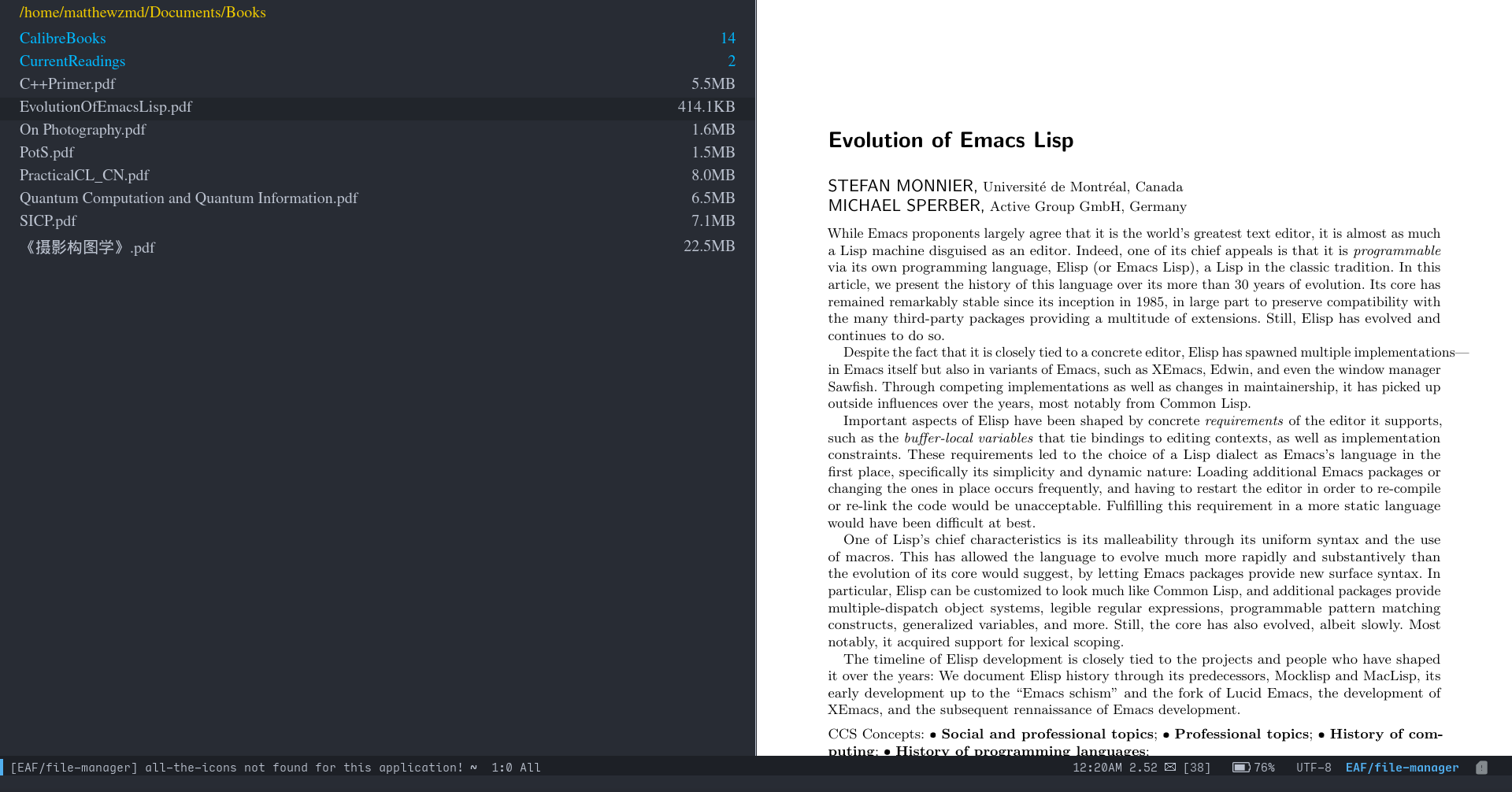 |
| | |
- [Browser](https://github.com/emacs-eaf/eaf-browser): Full-featured browser
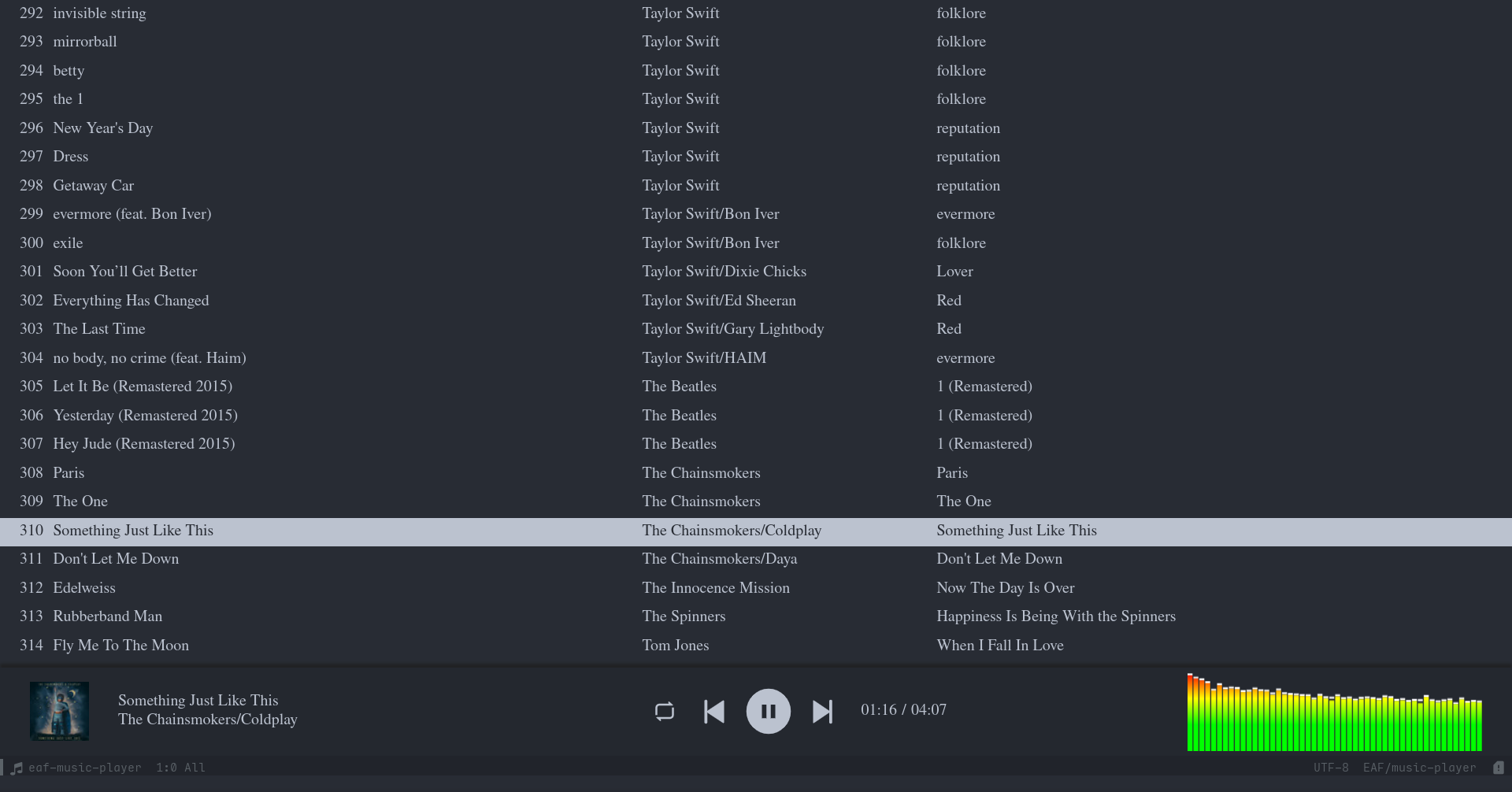
- [PDF Viewer](https://github.com/emacs-eaf/eaf-pdf-viewer): The fastest PDF reader
- [Terminal](https://github.com/emacs-eaf/eaf-terminal): Full-featured terminal
- [Video Player](https://github.com/emacs-eaf/eaf-video-player): Video player base on Qt
- [Markdown Previewer](https://github.com/emacs-eaf/eaf-markdown-previewer): Markdown file previewer in Emacs
- [Org Previewer](https://github.com/emacs-eaf/eaf-org-previewer): Org file previewer in Emacs
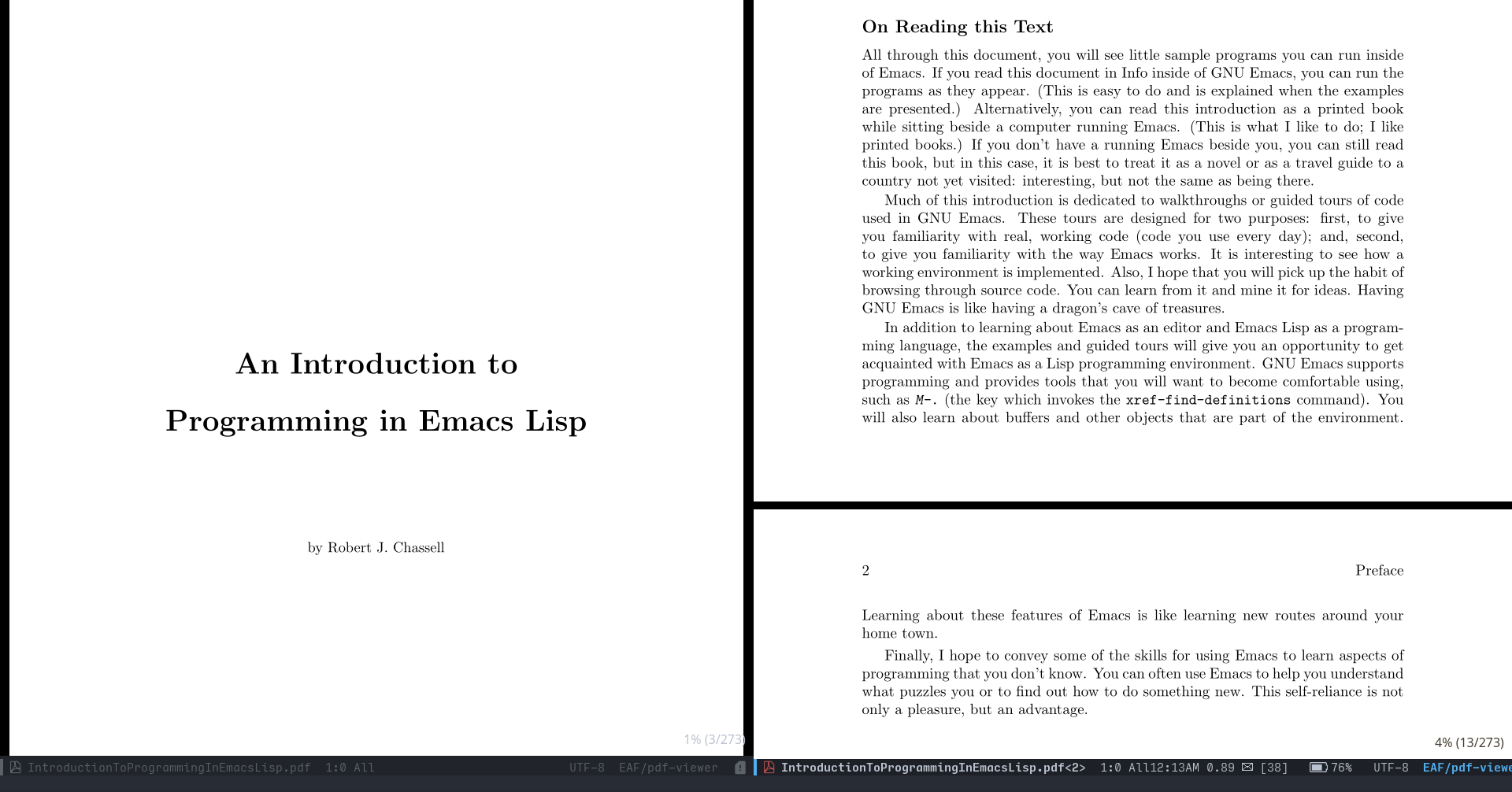
- [Music Player](https://github.com/emacs-eaf/eaf-music-player): Music player, support playlist and an audio visualization
- [RSS Reader](https://github.com/emacs-eaf/eaf-rss-reader): RSS reader, rendering html content in expected
- [File Manager](https://github.com/emacs-eaf/eaf-file-manager): File manager, support file real-time preview
- [Mindmap](https://github.com/emacs-eaf/eaf-mindmap): Mindmap with full-featured keyboard operation
- [Jupyter](https://github.com/emacs-eaf/eaf-jupyter): Jupyter in Emacs
- [Image Viewer](https://github.com/emacs-eaf/eaf-image-viewer): Picture viewer, supporting real-time zoom rotation
- [Camera](https://github.com/emacs-eaf/eaf-camera): Use camera in Emacs
- [System Monitor](https://github.com/emacs-eaf/eaf-system-monitor): System monitor base on Vue.js
- [Netease Cloud Music](https://github.com/emacs-eaf/eaf-netease-cloud-music): EAF frontend for NetEase cloud music
- [File Browser](https://github.com/emacs-eaf/eaf-file-browser): Browse file in mobile phone
- [File Sender](https://github.com/emacs-eaf/eaf-file-sender): Share file between Emacs and mobile phone
- [Airshare](https://github.com/emacs-eaf/eaf-airshare): Share text between Emacs and mobile phone
- [Demo](https://github.com/emacs-eaf/eaf-demo): EAF Application demo base on Qt
- [Vue Demo](https://github.com/emacs-eaf/eaf-vue-demo): EAF Application demo base on Vue.js
In theory, you can use EAF to integrate any Qt5/Vue.js application into Emacs.
EAF supports Linux X11、Linux Wayland and Windows, while macOS and FreeBSD support are in beta, some applications may not work normally.
## EmacsConf2020 - Extend Emacs to Modern GUI Applications with EAF
A talk presented at the [EmacsConf2020](https://emacsconf.org/2020/talks/34/) that dwells into the internals of EAF.
[](https://www.youtube.com/watch?v=HK_f8KTuR0s)
## EmacsConf2021 - Emacs Application Framework: A 2021 Update
A talk presented at the [EmacsConf2021](https://emacsconf.org/2021/talks/eaf/) that gives a summary of EAF progress throughout the 2021 year.
[](https://www.youtube.com/watch?v=bh37zbefZk4)
## Install
#### 1. Download EAF
```Bash
git clone --depth=1 -b master https://github.com/emacs-eaf/emacs-application-framework.git ~/.emacs.d/site-lisp/emacs-application-framework/
```
#### 2. Install/Update EAF applications and dependencies
You can use `M-x eaf-install-and-update` or manually run the `install-eaf.py` script in the EAF directory:
```Bash
cd emacs-application-framework
chmod +x ./install-eaf.py
./install-eaf.py
```
There are many useful flags available for `install-eaf.py`, check it yourself using `--help`.
#### 3. Load EAF Core
From here on, you can either add the full path to the EAF installation directory to your Emacs ```load-path```, then add the following to `init.el`:
```Elisp
(add-to-list 'load-path "~/.emacs.d/site-lisp/emacs-application-framework/")
(require 'eaf)
```
- If you use virtual/conda environment, or you simply want to use `python3` instead of `python` executable, you might want to set `eaf-python-command` to something like `/usr/bin/python3/`.
- Alternatively, if you use [use-package](https://github.com/jwiegley/use-package), you can use the following *sample* configuration for your convenience.
```Elisp
(use-package eaf
:load-path "~/.emacs.d/site-lisp/emacs-application-framework" ; Set to "/usr/share/emacs/site-lisp/eaf" if installed from AUR
:custom
; See https://github.com/emacs-eaf/emacs-application-framework/wiki/Customization
(eaf-browser-continue-where-left-off t)
(eaf-browser-enable-adblocker t)
(browse-url-browser-function 'eaf-open-browser)
:config
(defalias 'browse-web #'eaf-open-browser)
(eaf-bind-key scroll_up "C-n" eaf-pdf-viewer-keybinding)
(eaf-bind-key scroll_down "C-p" eaf-pdf-viewer-keybinding)
(eaf-bind-key take_photo "p" eaf-camera-keybinding)
(eaf-bind-key nil "M-q" eaf-browser-keybinding)) ;; unbind, see more in the Wiki
```
#### 4. Load EAF Apps
You can use below code to load applications `browser` and `pdf-viewer` that you installed, please check [Applications](https://github.com/emacs-eaf/emacs-application-framework#applications) for the full list:
```Elisp
(require 'eaf-browser)
(require 'eaf-pdf-viewer)
...
```
#### 5. Hooray!
Congratulations, you just installed EAF! You can try `M-x eaf-open-demo` (that is if you have `demo` installed, of course) to see if everything works properly, and enjoy the new possibilities of Emacs.
I **highly** encourage you to read the [Wiki](#Wiki) and [FAQ](#FAQ) if you have any questions.
Also, you should regularly `git pull` **and** run `install-eaf.py` (`M-x eaf-install-and-update`) to update EAF, its applications, and relating dependencies. If you encounter a bug while using it, see the instruction on how to [Report bug](#report-bug).
### Dependency List
| Package | Description |
| :-------- | :------ |
| python-epc | EPC for Python |
| python-pyqt5, python-pyqt5-sip | Essential GUI library |
| python-pyqtwebengine | Chromium-based web rendering engine |
| wmctrl | Activate Emacs window input focus |
| pygetwindow | Activate Emacs window input focus on WSL from Windows |
| mac-app-frontmost | Monitor frontmost app on macOS |
| nodejs | Installs dependencies, and for app communications |
You can check `app/name/dependencies.json` and `app/name/package.json` for application level dependencies.
## Launch EAF Applications
| Application Name | Launch |
| :-------- | :---- |
| Browser | `M-x eaf-open-browser` Search or Goto URL |
| | `M-x eaf-open-browser-with-history` Search or Goto URL or Goto History |
| HTML Email Renderer | `M-x eaf-open-mail-as-html` in `gnus`, `mu4e`, `notmuch` HTMl Mail |
| PDF Viewer | `M-x eaf-open` PDF File |
| Video Player | `M-x eaf-open` Video File |
| Image Viewer | `M-x eaf-open` Image File |
| Markdown Previewer | `M-x eaf-open` Markdown File |
| Org Previewer | `M-x eaf-open` Org File |
| Camera | `M-x eaf-open-camera` |
| Terminal | `M-x eaf-open-terminal` |
| File Manager | `M-x eaf-open-in-file-manager` |
| File Sender | `M-x eaf-file-sender-qrcode` or `eaf-file-sender-qrcode-in-dired` |
| File Browser | `M-x eaf-file-browser-qrcode` |
| Airshare | `M-x eaf-open-airshare` |
| Mindmap | `M-x eaf-create-mindmap` or `M-x eaf-open-mindmap` |
| MS Office Viewer | `M-x eaf-open-office` |
| Jupyter | `M-x eaf-open-jupyter` |
| Music Player | `M-x eaf-open-music-player` |
| System Monitor | `M-x eaf-open-system-monitor` |
| Demo | `M-x eaf-open-demo` to verify basic functionality |
| Vue Demo | `M-x eaf-open-vue-demo` to verify vue.js functionality |
- EAF Browser and PDF Viewer support Emacs built-in bookmark operation, with `M-x bookmark-set` (defaulted to `C-x r m`) and `M-x bookmark-bmenu-list` (defaulted to `C-x r l`).
## Keybindings
### Global Keybindings
| Key | Event |
| :-- | :-- |
| `C-h m` | eaf-describe-bindings |
| `C-c b` | eaf-open-bookmark |
| `C-c e` | eaf-open-external |
| `C-c i` | eaf-import-chrome-bookmarks |
| `M-/` | eaf-get-path-or-url |
| `M-'` | eaf-toggle-fullscreen |
| `M-[` | eaf-share-path-or-url |
### Bottom Pop Edit Buffer Keybindings
| Key | Event |
| :-- | :-- |
| `C-c C-c` | eaf-edit-buffer-confirm |
| `C-c C-k` | eaf-edit-buffer-cancel |
| `C-c C-t` | eaf-edit-buffer-switch-to-org-mode |
## Wiki
It is **highly** suggested to read the [Wiki](https://github.com/emacs-eaf/emacs-application-framework/wiki) first before using EAF.
The wiki consists of documentations on:
* Keybindings
* Customization
* Design
* TODOLIST
There also are some helpful tips to make EAF work with Docker, Helm, etc.
## FAQ
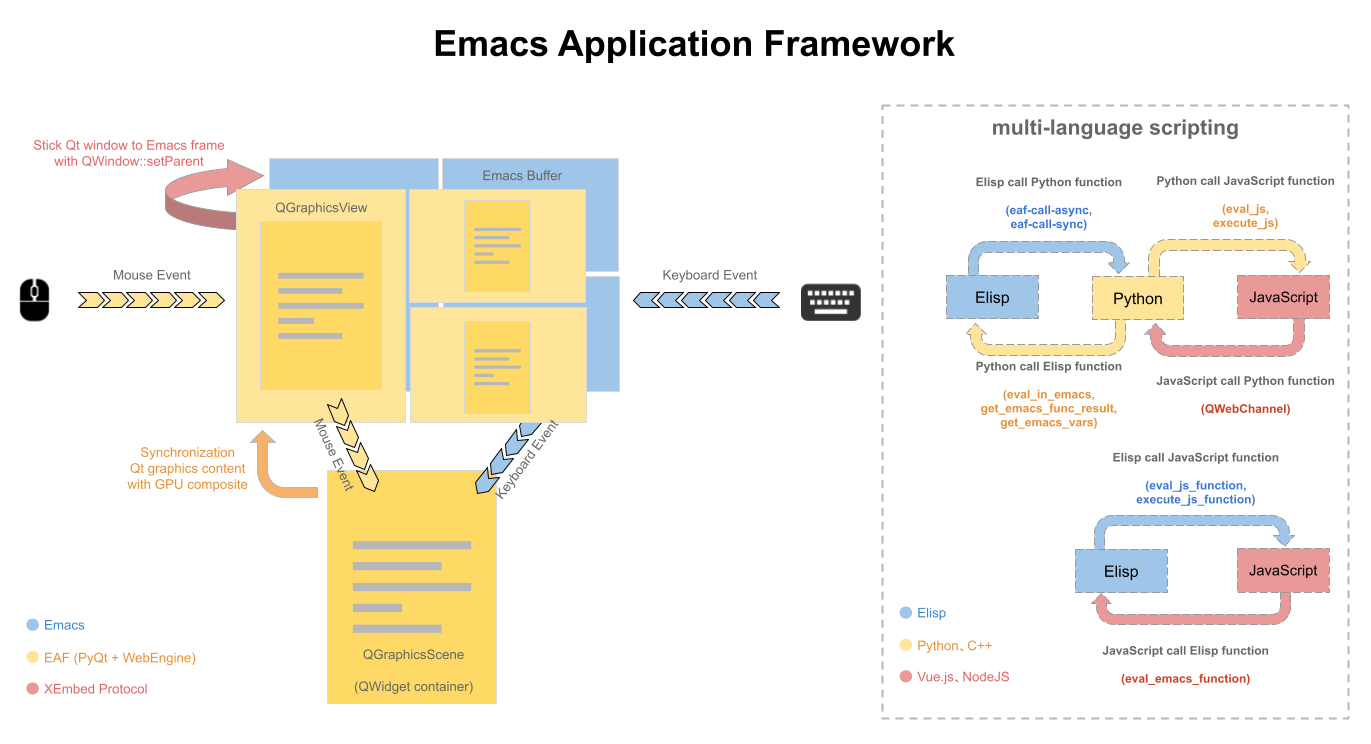
### How does EAF work?
|
| | |
- [Browser](https://github.com/emacs-eaf/eaf-browser): Full-featured browser
- [PDF Viewer](https://github.com/emacs-eaf/eaf-pdf-viewer): The fastest PDF reader
- [Terminal](https://github.com/emacs-eaf/eaf-terminal): Full-featured terminal
- [Video Player](https://github.com/emacs-eaf/eaf-video-player): Video player base on Qt
- [Markdown Previewer](https://github.com/emacs-eaf/eaf-markdown-previewer): Markdown file previewer in Emacs
- [Org Previewer](https://github.com/emacs-eaf/eaf-org-previewer): Org file previewer in Emacs
- [Music Player](https://github.com/emacs-eaf/eaf-music-player): Music player, support playlist and an audio visualization
- [RSS Reader](https://github.com/emacs-eaf/eaf-rss-reader): RSS reader, rendering html content in expected
- [File Manager](https://github.com/emacs-eaf/eaf-file-manager): File manager, support file real-time preview
- [Mindmap](https://github.com/emacs-eaf/eaf-mindmap): Mindmap with full-featured keyboard operation
- [Jupyter](https://github.com/emacs-eaf/eaf-jupyter): Jupyter in Emacs
- [Image Viewer](https://github.com/emacs-eaf/eaf-image-viewer): Picture viewer, supporting real-time zoom rotation
- [Camera](https://github.com/emacs-eaf/eaf-camera): Use camera in Emacs
- [System Monitor](https://github.com/emacs-eaf/eaf-system-monitor): System monitor base on Vue.js
- [Netease Cloud Music](https://github.com/emacs-eaf/eaf-netease-cloud-music): EAF frontend for NetEase cloud music
- [File Browser](https://github.com/emacs-eaf/eaf-file-browser): Browse file in mobile phone
- [File Sender](https://github.com/emacs-eaf/eaf-file-sender): Share file between Emacs and mobile phone
- [Airshare](https://github.com/emacs-eaf/eaf-airshare): Share text between Emacs and mobile phone
- [Demo](https://github.com/emacs-eaf/eaf-demo): EAF Application demo base on Qt
- [Vue Demo](https://github.com/emacs-eaf/eaf-vue-demo): EAF Application demo base on Vue.js
In theory, you can use EAF to integrate any Qt5/Vue.js application into Emacs.
EAF supports Linux X11、Linux Wayland and Windows, while macOS and FreeBSD support are in beta, some applications may not work normally.
## EmacsConf2020 - Extend Emacs to Modern GUI Applications with EAF
A talk presented at the [EmacsConf2020](https://emacsconf.org/2020/talks/34/) that dwells into the internals of EAF.
[](https://www.youtube.com/watch?v=HK_f8KTuR0s)
## EmacsConf2021 - Emacs Application Framework: A 2021 Update
A talk presented at the [EmacsConf2021](https://emacsconf.org/2021/talks/eaf/) that gives a summary of EAF progress throughout the 2021 year.
[](https://www.youtube.com/watch?v=bh37zbefZk4)
## Install
#### 1. Download EAF
```Bash
git clone --depth=1 -b master https://github.com/emacs-eaf/emacs-application-framework.git ~/.emacs.d/site-lisp/emacs-application-framework/
```
#### 2. Install/Update EAF applications and dependencies
You can use `M-x eaf-install-and-update` or manually run the `install-eaf.py` script in the EAF directory:
```Bash
cd emacs-application-framework
chmod +x ./install-eaf.py
./install-eaf.py
```
There are many useful flags available for `install-eaf.py`, check it yourself using `--help`.
#### 3. Load EAF Core
From here on, you can either add the full path to the EAF installation directory to your Emacs ```load-path```, then add the following to `init.el`:
```Elisp
(add-to-list 'load-path "~/.emacs.d/site-lisp/emacs-application-framework/")
(require 'eaf)
```
- If you use virtual/conda environment, or you simply want to use `python3` instead of `python` executable, you might want to set `eaf-python-command` to something like `/usr/bin/python3/`.
- Alternatively, if you use [use-package](https://github.com/jwiegley/use-package), you can use the following *sample* configuration for your convenience.
```Elisp
(use-package eaf
:load-path "~/.emacs.d/site-lisp/emacs-application-framework" ; Set to "/usr/share/emacs/site-lisp/eaf" if installed from AUR
:custom
; See https://github.com/emacs-eaf/emacs-application-framework/wiki/Customization
(eaf-browser-continue-where-left-off t)
(eaf-browser-enable-adblocker t)
(browse-url-browser-function 'eaf-open-browser)
:config
(defalias 'browse-web #'eaf-open-browser)
(eaf-bind-key scroll_up "C-n" eaf-pdf-viewer-keybinding)
(eaf-bind-key scroll_down "C-p" eaf-pdf-viewer-keybinding)
(eaf-bind-key take_photo "p" eaf-camera-keybinding)
(eaf-bind-key nil "M-q" eaf-browser-keybinding)) ;; unbind, see more in the Wiki
```
#### 4. Load EAF Apps
You can use below code to load applications `browser` and `pdf-viewer` that you installed, please check [Applications](https://github.com/emacs-eaf/emacs-application-framework#applications) for the full list:
```Elisp
(require 'eaf-browser)
(require 'eaf-pdf-viewer)
...
```
#### 5. Hooray!
Congratulations, you just installed EAF! You can try `M-x eaf-open-demo` (that is if you have `demo` installed, of course) to see if everything works properly, and enjoy the new possibilities of Emacs.
I **highly** encourage you to read the [Wiki](#Wiki) and [FAQ](#FAQ) if you have any questions.
Also, you should regularly `git pull` **and** run `install-eaf.py` (`M-x eaf-install-and-update`) to update EAF, its applications, and relating dependencies. If you encounter a bug while using it, see the instruction on how to [Report bug](#report-bug).
### Dependency List
| Package | Description |
| :-------- | :------ |
| python-epc | EPC for Python |
| python-pyqt5, python-pyqt5-sip | Essential GUI library |
| python-pyqtwebengine | Chromium-based web rendering engine |
| wmctrl | Activate Emacs window input focus |
| pygetwindow | Activate Emacs window input focus on WSL from Windows |
| mac-app-frontmost | Monitor frontmost app on macOS |
| nodejs | Installs dependencies, and for app communications |
You can check `app/name/dependencies.json` and `app/name/package.json` for application level dependencies.
## Launch EAF Applications
| Application Name | Launch |
| :-------- | :---- |
| Browser | `M-x eaf-open-browser` Search or Goto URL |
| | `M-x eaf-open-browser-with-history` Search or Goto URL or Goto History |
| HTML Email Renderer | `M-x eaf-open-mail-as-html` in `gnus`, `mu4e`, `notmuch` HTMl Mail |
| PDF Viewer | `M-x eaf-open` PDF File |
| Video Player | `M-x eaf-open` Video File |
| Image Viewer | `M-x eaf-open` Image File |
| Markdown Previewer | `M-x eaf-open` Markdown File |
| Org Previewer | `M-x eaf-open` Org File |
| Camera | `M-x eaf-open-camera` |
| Terminal | `M-x eaf-open-terminal` |
| File Manager | `M-x eaf-open-in-file-manager` |
| File Sender | `M-x eaf-file-sender-qrcode` or `eaf-file-sender-qrcode-in-dired` |
| File Browser | `M-x eaf-file-browser-qrcode` |
| Airshare | `M-x eaf-open-airshare` |
| Mindmap | `M-x eaf-create-mindmap` or `M-x eaf-open-mindmap` |
| MS Office Viewer | `M-x eaf-open-office` |
| Jupyter | `M-x eaf-open-jupyter` |
| Music Player | `M-x eaf-open-music-player` |
| System Monitor | `M-x eaf-open-system-monitor` |
| Demo | `M-x eaf-open-demo` to verify basic functionality |
| Vue Demo | `M-x eaf-open-vue-demo` to verify vue.js functionality |
- EAF Browser and PDF Viewer support Emacs built-in bookmark operation, with `M-x bookmark-set` (defaulted to `C-x r m`) and `M-x bookmark-bmenu-list` (defaulted to `C-x r l`).
## Keybindings
### Global Keybindings
| Key | Event |
| :-- | :-- |
| `C-h m` | eaf-describe-bindings |
| `C-c b` | eaf-open-bookmark |
| `C-c e` | eaf-open-external |
| `C-c i` | eaf-import-chrome-bookmarks |
| `M-/` | eaf-get-path-or-url |
| `M-'` | eaf-toggle-fullscreen |
| `M-[` | eaf-share-path-or-url |
### Bottom Pop Edit Buffer Keybindings
| Key | Event |
| :-- | :-- |
| `C-c C-c` | eaf-edit-buffer-confirm |
| `C-c C-k` | eaf-edit-buffer-cancel |
| `C-c C-t` | eaf-edit-buffer-switch-to-org-mode |
## Wiki
It is **highly** suggested to read the [Wiki](https://github.com/emacs-eaf/emacs-application-framework/wiki) first before using EAF.
The wiki consists of documentations on:
* Keybindings
* Customization
* Design
* TODOLIST
There also are some helpful tips to make EAF work with Docker, Helm, etc.
## FAQ
### How does EAF work?